
Look, I'm just going to say it: the iPad keyboard is hot garbage. Not the hardware keyboards—those are fine. I'm talking about the on-screen keyboard that Apple somehow thought was acceptable to ship on a device people use for actual work.
Here's my specific gripe: there's no permanent number row. You know, that thing that's been on every computer keyboard since forever? Yeah, Apple decided iPad users don't need that. Instead, you get to play the fun game of tapping "123" every time you need a number, then tapping "ABC" to get back to letters. It's like they designed it specifically to waste your time.
And before you suggest it—I'm not against external keyboards. In fact, I'm pretty sure I have one packed away from my old iPad that bit the dust, or an extra Bluetooth/wireless keyboard laying around somewhere. But if I'm going to pull out an external keyboard, I'm basically going into note-taking or pseudo-laptop mode at that point. The whole appeal of the iPad is being able to hold it and use it casually—not turning it into a makeshift laptop setup all the time.
The Privacy Problem
So naturally, I looked for third-party keyboards. Gboard has a number row. SwiftKey has a number row. Problem solved, right?
Wrong.
I already built an AdGuard server for my home network because I care about privacy. I'm not about to install Google's keyboard that hoovers up everything I type and feeds it to their ad machine. And Microsoft's SwiftKey? Same deal—it's all going to Copilot or whatever AI they're training this week.
I want a keyboard that:
- Gives me better access to numbers
- Doesn't spy on me
- Works while holding my iPad
Apparently, this is too much to ask in 2025.
Enter Typewise
After digging around, I found Typewise—a keyboard that runs 100% offline with zero data collection. Everything happens on-device. No cloud sync, no telemetry on what you type, nothing. It's GDPR-compliant and privacy-first by design.
Full disclosure: Yes, Typewise does have AI features available (autocorrection, text prediction, etc.). But here's the key part: the AI runs entirely offline on your device, and you can turn features off if you want. There's even an offline-only mode. Some people would be turned off by even having AI as an option, so I wanted to mention it upfront—but the difference here is that it's all local processing, not sending your data to the cloud.
Moving on...
Great! Problem solved!
Except... it has a hexagonal keyboard layout. Not QWERTY. Hexagons. Like a honeycomb.
My first thought: "What the hell is this?"
My second thought: "Well, I've already committed to this privacy thing. Let's see what happens."
When you first set up Typewise, it actually prompts you to choose between the hexagonal layout and a traditional QWERTY layout. So you're not forced into the honeycomb madness if you don't want it. But I figured—why not go all in? I decided to try the hexagonal layout.
Boy, This Is Different
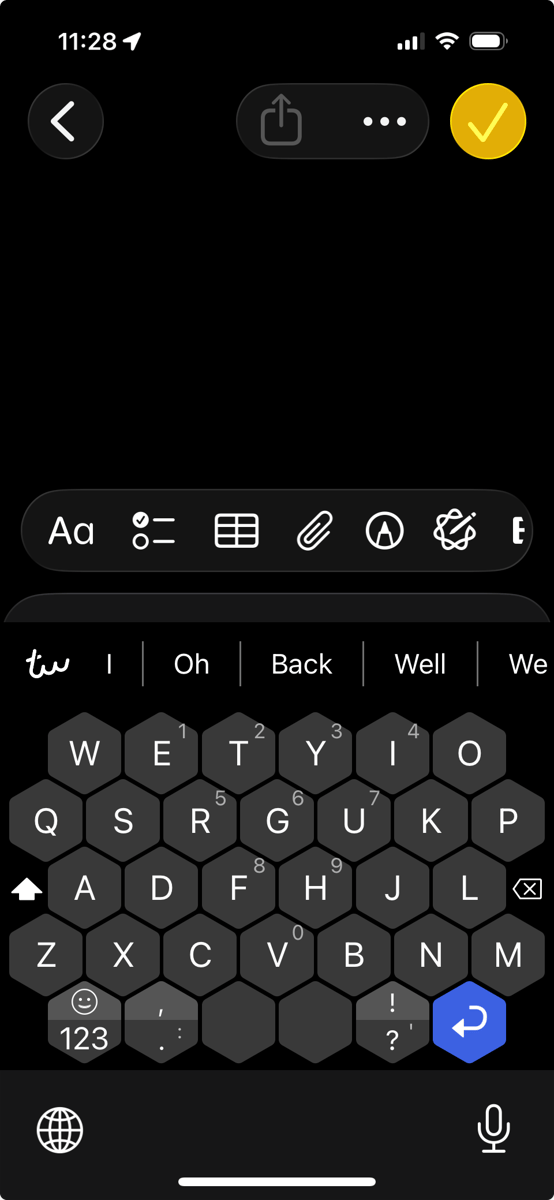
I'm not typing this on the hexagonal layout—I'm on my dev laptop. But I've been using Typewise almost exclusively on my phone and iPad, and yeah—it's weird. The keys are arranged in a honeycomb pattern instead of the traditional grid. There's both a dedicated backspace button (opposite the shift key) AND a swipe-left gesture to delete. You can swipe right to restore what you just deleted.
It feels like typing on a gamepad. Which, honestly, makes sense—the hexagonal layout is optimized for two-thumb typing, just like how you hold a game controller.
The keys are larger than traditional keyboards, which means fewer mis-taps. And once you adjust (supposedly after about a week), you're supposed to type 33% faster with fewer typos.
I'm not there yet. Right now, I'm making tons of mistakes and questioning my life choices.
Here's something interesting though: You can actually change the layout of the hexagonal keyboard itself. It defaults to auto-detect based on your region, but you can manually swap to QWERTZ, Dvorak, Colemak, and a bunch of others (especially if you upgrade to PRO). So while you might be used to your region's specific layout, you might find a different key arrangement easier to adapt to on the hexagonal grid. It's all in the settings.
The iPad Version Is Even Weirder
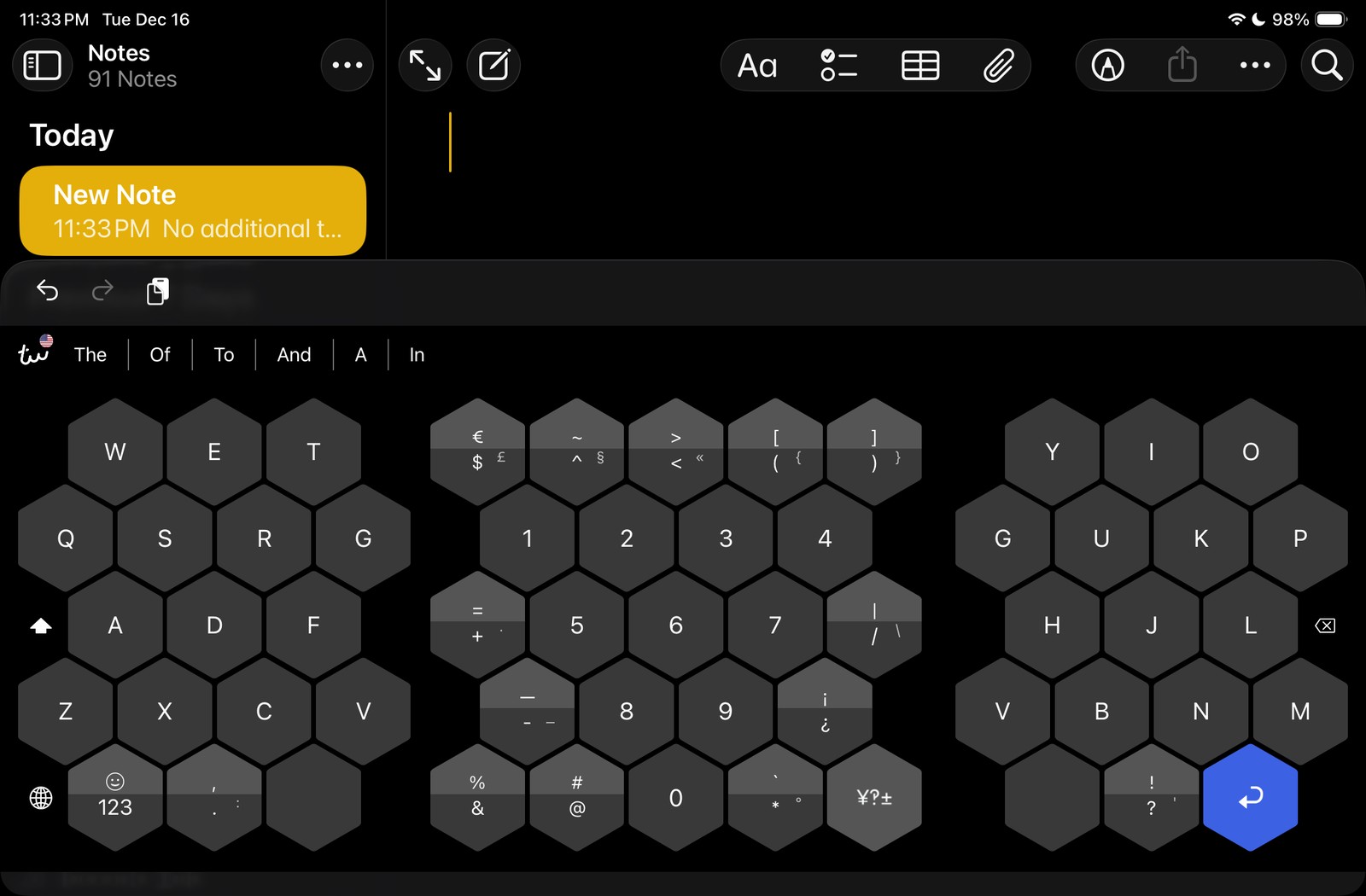
I installed it on my iPad too, and the layout feels much bigger than Apple's built-in keyboard. Apple's keyboard is cramped and small relative to the screen. Typewise takes up more space but gives you actual room to work with.
The gamepad comparison is even more accurate on the iPad. It genuinely feels like I'm using a controller interface instead of a keyboard.
What About the Number Row?
Here's the reality: Typewise doesn't have a dedicated number row. But what it DOES have is the ability to press and hold keys to access numbers, and you can even have the numbers displayed on the keys. On the hexagonal layout in horizontal mode on iPad, you can get dedicated number keys in the middle hexagon (not available on iPhone). On iPhone, you use the press-and-hold method.
So it's not the permanent number row I originally wanted, but it's better than constantly switching between ABC and 123 keyboards.
The Reality Check
Here's where I'm at:
The Good:
- 100% privacy—nothing I type leaves my device
- Larger keys mean fewer accidental taps
- Both hexagonal and traditional QWERTY layouts available (you choose during setup)
- Works on both iPhone and iPad
- Press-and-hold for numbers is better than keyboard switching
- Bonus: Nobody's going to ask to borrow my phone to type something
The Bad:
- The hexagonal layout has a steep learning curve
- I'm currently typing slower than I did before
- I told my wife I was trying it and she said I was weird. I told her she knew that when she married me.
- No true dedicated number row like I originally wanted
- I wish it had stickers in the emoji section
The Verdict (So Far):
It's too early to tell. I'm giving it a full week before I decide if this is genius or madness. The privacy protection is real, and that matters to me. The press-and-hold for numbers is workable. But if I'm still fumbling with this keyboard after a week, I have options: I could stick with the traditional QWERTY layout (which also supports the press-and-hold for numbers) and just get more comfortable with the gestures, or I might accept that Apple's keyboard sucks and live with it.
Why This Matters
The fact that I had to resort to a hexagonal keyboard layout to get basic privacy is absurd. Apple could fix this tomorrow by adding a number row toggle to iPadOS. They won't, because... reasons? The 13-inch iPad Pro gets a number row, but every other iPad is stuck in keyboard hell.
So here I am, retraining my muscle memory on a honeycomb keyboard because I refuse to let Google or Microsoft track everything I type. It's 2025, and this is what privacy looks like.
I'll update this post in a week with my final verdict. Either I'll be typing faster than ever with complete privacy, or I'll be back to Apple's garbage keyboard, angrily tapping "123" every time I need to type a number.
---
Have you tried alternative keyboards for privacy reasons? Let me know in the comments. Bonus points if you've also built an AdGuard server and had your spouse call you weird.